CLaunch是一款免费的启动栏软件,它可以帮助你快速启动应用程序、打开文件和文件夹、执行命令,以及访问网站等。
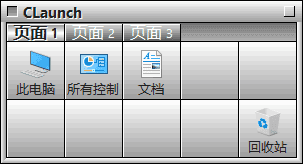
软件功能
- 自定义启动栏样式:可以自由更改启动栏的样式、颜色和透明度等。
- 快速启动应用程序:通过单击启动栏上的图标,可以快速启动你需要的应用程序。
- 打开文件和文件夹:通过将文件和文件夹拖放到启动栏上,可以快速打开它们。
- 执行系统命令:例如,可以通过启动栏快速打开控制面板、命令提示符、任务管理器等。
- 访问网站:可以在启动栏上设置您常用的网站,轻松访问您所需的网站。
软件特点
- 界面简洁易用:CLaunch采用直观简单的用户界面,即使是初学者也能快速上手。
- 自定义性强:您可以根据需要自定义启动栏的大小、样式和功能,使其适应您的使用习惯。
- 轻量级:CLaunch的安装包非常小,占用系统资源也很少,可以保证您的电脑始终保持流畅。
- 全局快捷键:CLaunch支持全局快捷键,在任何时候都可以通过快捷键访问启动栏。
更新日志
Ver. 4.21 Mar. 26, 2026 Added the “Include tooltip text in item search” option Added the “Multi-line text” option for tabs Fixed a bug where button operation commands assigned to the middle-click did not work Fixed a bug where CLaunch could not be activated when the display position option was set to “Center of the Screen” Fixed a bug where menus could not be operated with the mouse when menu-related commands were assigned to mouse actions involving left and right clicks Fixed a bug where data on the line following string-type data could not be retrieved when reading plugin INI files Added the CPI function CpiDeleteData
下载地址
CLaunch(免费快速启动工具) v4.21 中文绿色版
https://pan.quark.cn/s/2bd2c005941c
https://pan.xunlei.com/s/VOodn9cIfyDFvhk-wD5xm5eIA1?pwd=fb7c#