QOwnNotes是一款功能强大的跨平台笔记应用程序,可以帮助用户轻松管理笔记、任务和清单。
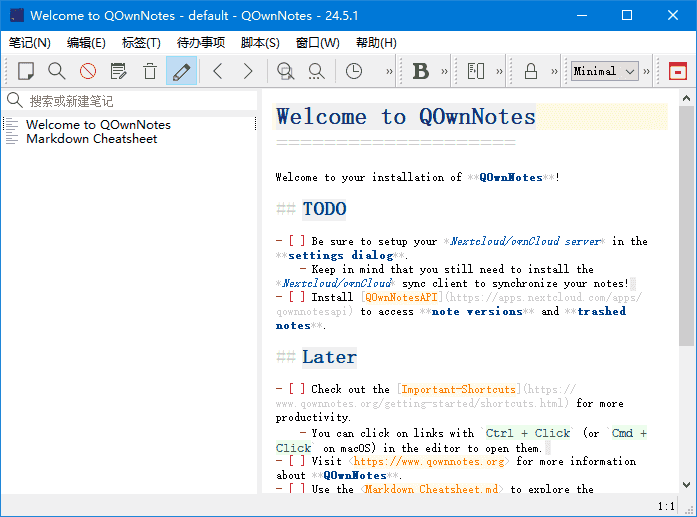
软件特点
1.支持多种编辑器:支持Markdown、Html、和其它多种文本编辑器; 2.易于搜索:可设置快捷键进行搜索,支持正则表达式搜索; 3.多个账户:可以管理多个账户,并可以自定义设置; 4.可定义笔记标签:可以使用标签来组织笔记,方便查找; 5.全文搜索:支持全文搜索,可以在整个笔记库中搜索文本; 6.数据同步:可以通过多种方式进行数据同步,包括Dropbox、Nextcloud等; 7.导出功能:可以通过PDF、HTML等格式导出笔记。
更新日志
26.3.19 Attempted to fix emoji characters (e.g. 🚫) rendering as incorrect glyphs (such as the Bitcoin B symbol) in the QLiteHtml preview on Windows by appending the platform-specific color-emoji font (“Segoe UI Emoji” on Windows, “Apple Color Emoji” on macOS, “Noto Color Emoji” on Linux) as a fallback in every font family list passed to Qt’s font engine, ensuring proper emoji glyph selection (for #3517) Moved the LanguageTool settings out of the Editor settings into a dedicated LanguageTool settings page (with a spell-check icon) in the settings sidebar (for #3496) Fixed spell checker and LanguageTool text replacements to first turn off read-only mode so the note will be stored when a suggestion is applied (for #3496) Fixed wrong foreground color of text underlined by LanguageTool: the underline overlay now preserves each character’s individual syntax-highlight color (e.g. heading, bold, link colors) instead of overwriting them with the color of the first character in the match span (for #3496) Fixed new note creation via Ctrl + N not including the current date in the note title (for #3516) Added more Korean, Spanish, Croatian, French, Swedish translation (thank you, VenusGirl, AlejandroMoc, milotype, jd-develop, ojn)
下载地址
QOwnNotes(跨平台笔记应用程序) v26.3.19 中文绿色版
https://pan.quark.cn/s/edf43cf3a0c0
https://pan.xunlei.com/s/VOoUkTCRlY8VOfGyM0nihkVbA1?pwd=se3u#