CLaunch是一款免费的启动栏软件,它可以帮助你快速启动应用程序、打开文件和文件夹、执行命令,以及访问网站等。
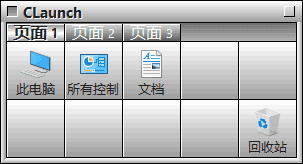
软件功能
- 自定义启动栏样式:可以自由更改启动栏的样式、颜色和透明度等。
- 快速启动应用程序:通过单击启动栏上的图标,可以快速启动你需要的应用程序。
- 打开文件和文件夹:通过将文件和文件夹拖放到启动栏上,可以快速打开它们。
- 执行系统命令:例如,可以通过启动栏快速打开控制面板、命令提示符、任务管理器等。
- 访问网站:可以在启动栏上设置您常用的网站,轻松访问您所需的网站。
软件特点
- 界面简洁易用:CLaunch采用直观简单的用户界面,即使是初学者也能快速上手。
- 自定义性强:您可以根据需要自定义启动栏的大小、样式和功能,使其适应您的使用习惯。
- 轻量级:CLaunch的安装包非常小,占用系统资源也很少,可以保证您的电脑始终保持流畅。
- 全局快捷键:CLaunch支持全局快捷键,在任何时候都可以通过快捷键访问启动栏。
更新日志
v4.20 Improved the button layout system by switching to row/column-based positioning Added horizontal scrolling for buttons Added “Row/Column Operations” to the button context menu Added the “Separate designs per View Mode” option Added the “Item Fill Direction” option Added the “Do Nothing” option to “Action when the program is already running” Added the “Unhook” special item Updated the commands assignable to keyboard and mouse operations Removed the file name length limitation for items Removed the “Use the Windows key as the shortcut key” option Removed the “Update Recycle Bin icon periodically” option Removed the ability to insert blank spaces between buttons by dragging a blank button Changed mouse-assigned CLaunch functions to trigger on mouse button release Changed window class name matching to prefix matching for “Action when the program is already running” and “Settings to disable for specific applications” settings Changed the control that blocks Windows key presses during dialogs so that it applies only when a key input control has focus Updated the skin XML specification Updated the plugin interface specification Fixed a bug that could cause the system to shut down when executing the “Sleep” or “Hibernate” special item Fixed a bug that caused CLaunch to exit when executing the “Pin” special item in non-resident mode Fixed a bug that prevented multiple plugins from being enabled Various UI improvements and minor bug fixes.
下载地址
CLaunch(免费启动栏软件) v4.20 中文绿色版
https://pan.quark.cn/s/4a59f665763f
https://pan.xunlei.com/s/VOnfyf5UqLuYDtjXj_-U4Ih8A1?pwd=57se#