QOwnNotes是一款功能强大的跨平台笔记应用程序,可以帮助用户轻松管理笔记、任务和清单。
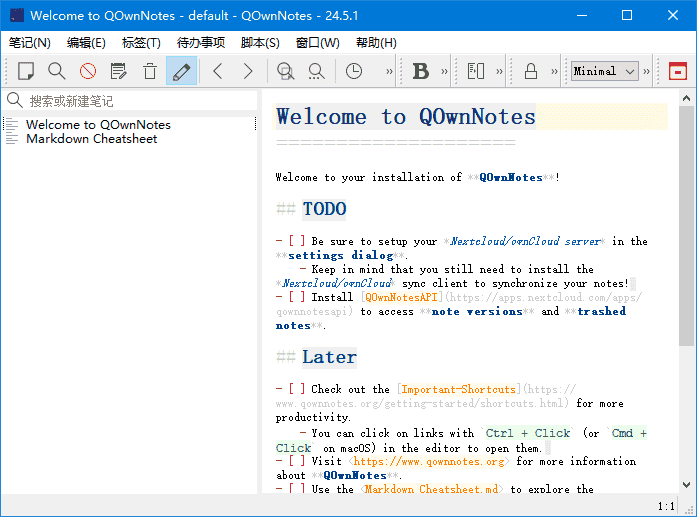
软件特点
1.支持多种编辑器:支持Markdown、Html、和其它多种文本编辑器; 2.易于搜索:可设置快捷键进行搜索,支持正则表达式搜索; 3.多个账户:可以管理多个账户,并可以自定义设置; 4.可定义笔记标签:可以使用标签来组织笔记,方便查找; 5.全文搜索:支持全文搜索,可以在整个笔记库中搜索文本; 6.数据同步:可以通过多种方式进行数据同步,包括Dropbox、Nextcloud等; 7.导出功能:可以通过PDF、HTML等格式导出笔记。
更新日志
26.2.13
Fixed indented fenced code blocks (with tabs or spaces before the opening fence) showing
raw CODEBLOCK placeholders instead of the actual code in the note preview
Fixed a backtick-fenced code block nested inside a 4-space/tab indented code block
causing highlight spans to be injected into verbatim content, making raw HTML like
test1=test2 appear in the preview
Fixed a backtick-fenced code block nested inside a tilde-fenced code block causing raw
HTML span tags (e.g. test1=test2) to appear as
visible literal text in the note preview
Fixed angle-bracket content inside code blocks (also 4-Spaces fence) and inline code
(e.g., <stdio.h>) being incorrectly converted to file links in the note preview
This also fixes regex preview issues
Fixed Markdown highlighter incorrectly formatting a tab-indented list subitem as a heading when
followed by a lone - on the next line
isParagraph() now treats tab-indented lines starting with - , + , or * as list items,
so they are no longer considered paragraph text eligible for setext heading detection
Added search filtering for scripts in the settings Scripting panel, matching name and details
Fixed clicking a Nextcloud Deck link not opening the Nextcloud Deck dialog anymore
The note editor’s openUrl method now routes Nextcloud Deck card URLs (https://…/apps/deck/#/board/…/card/…)
through UrlHandler instead of handing them off to QDesktopServices
The note preview’s anchor-click handler (onNotePreviewAnchorClicked) now also recognises Deck card URLs
and routes them through UrlHandler so the dialog opens correctly from the preview pane as well
The card ID is now parsed directly from the URL path instead of requiring a pre-configured board ID
that exactly matches the clicked link, so the dialog opens regardless of which board the card belongs to
Removed the isEnabled() gate from the link-click handler so the Nextcloud Deck dialog opens even when
the Deck integration is not fully configured for card creation
Fixed Ctrl+clicking a Deck link in the note editor not opening the Nextcloud Deck dialog;
the ignored-click URL regexp for Deck card links was causing openLinkAtCursorPosition()
to swallow the click before it could reach openUrl()
Added strikeout support to the QLiteHtml preview widget so that strikeout text
is rendered with a line-through decoration in the note preview
QLiteHtml’s built-in CSS has no rule for or elements, so the CSS
del, s, del *, s * { text-decoration: line-through; } is now injected into the HTML
head before passing it to the widget
Descendant elements such as links () inside strikeout are also struck out;
the del * selector is required because text-decoration is not an inherited CSS
property and the preview stylesheet’s a { text-decoration: none; } would otherwise win
Improved multi-note selection preview styling in the QLiteHtml preview widget for dark mode
Colors are now derived from the active editor schema instead of hardcoded light/dark fallback
values, so the preview correctly respects any user-configured theme
Body background, foreground, and link colors all follow the schema’s NoState and Link states
The alternating row background and muted date text are computed by blending the schema
background toward the foreground, keeping contrast consistent across all themes
下载地址
QOwnNotes(跨平台笔记应用程序) v26.2.13 中文绿色版
https://pan.quark.cn/s/dcd1e6aa2984
https://pan.xunlei.com/s/VOmTxMHRUBwRjBWOLv-xLyVRA1?pwd=pxv8#