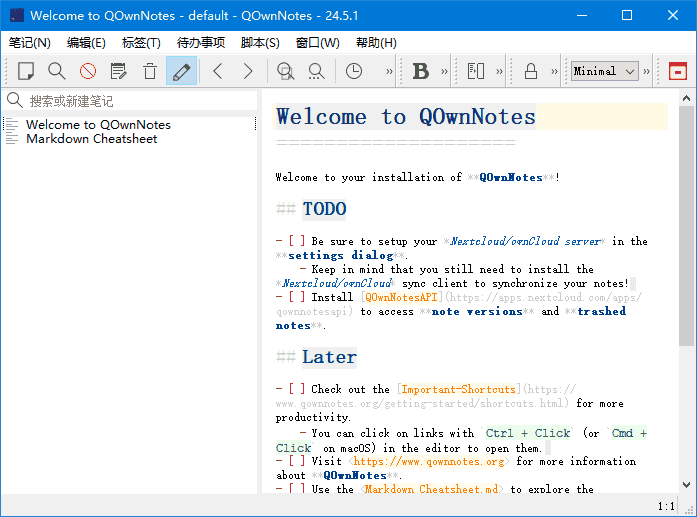
QOwnNotes是一款功能强大的跨平台笔记应用程序,可以帮助用户轻松管理笔记、任务和清单。
软件特点
1.支持多种编辑器:支持Markdown、Html、和其它多种文本编辑器; 2.易于搜索:可设置快捷键进行搜索,支持正则表达式搜索; 3.多个账户:可以管理多个账户,并可以自定义设置; 4.可定义笔记标签:可以使用标签来组织笔记,方便查找; 5.全文搜索:支持全文搜索,可以在整个笔记库中搜索文本; 6.数据同步:可以通过多种方式进行数据同步,包括Dropbox、Nextcloud等; 7.导出功能:可以通过PDF、HTML等格式导出笔记。
更新日志
26.1.14 Fixed a regression where Ctrl + Click on links in the note editor caused them to be opened twice (for #3447) Links are now opened only once when clicked with Ctrl Added bookmark markers (1-9) next to line numbers in the note editor (for #3453) When you store a note bookmark (Ctrl+1 through Ctrl+9), the bookmark slot number is now displayed in red next to the line number in the editor Bookmark markers are only shown for the current note The “Show line numbers” setting needs to be enabled in the editor settings Fixed table border colors in dark mode preview to be white instead of black (for #3442) Table borders are now properly visible in dark mode Border colors automatically adapt based on the dark mode setting
下载地址
QOwnNotes(跨平台笔记应用程序) v26.1.14 中文绿色版
https://pan.quark.cn/s/a9a1b4b66512
https://pan.xunlei.com/s/VOk6FT3IwRKDn6W2Z5ySHlXWA1?pwd=yewc#